
| 일 | 월 | 화 | 수 | 목 | 금 | 토 |
|---|---|---|---|---|---|---|
| 1 | 2 | 3 | 4 | 5 | 6 | |
| 7 | 8 | 9 | 10 | 11 | 12 | 13 |
| 14 | 15 | 16 | 17 | 18 | 19 | 20 |
| 21 | 22 | 23 | 24 | 25 | 26 | 27 |
| 28 | 29 | 30 |
Tags
- cs231n
- Gentoo2
- Data Science
- file system
- deep learning
- Operating System
- Multimedia
- Python
- Baekjoon
- CNN
- RNN
- Optimization
- Process
- Seoul National University
- 밑바닥부터 시작하는 딥러닝2
- DFS
- ROS2
- C++
- Humble
- Robocup@Home 2026
- BFS
- SQLD
- paper review
- System Call
- do it! 알고리즘 코딩테스트: c++편
- On-memory file system
- Machine Learning
- Linux
- computer vision
- CPP
Archives
- Today
- Total
newhaneul
[Advanced Python Programming] Lecture 12. Pandas 본문
4. University Study/Advanced Python Programming
[Advanced Python Programming] Lecture 12. Pandas
뉴하늘 2026. 5. 24. 21:36728x90
포스팅은 인하대학교 허혜선 교수님의 [202601-EEC3408-001] 고급파이썬프로그래밍을 수강하고 공부한 내용을 정리하기 위한 포스팅입니다.
1. Pandas Dataframe
- DataFrame(): 키에 해당하는 부분은 열 이름이 되고, 값은 열에 대한 각 행의 데이터로 리스트 형식을 사용
- display(): 데이터프레임을 출력할 수 있음
import pandas as pd
df = pd.DataFrame({'name': ['Jessica', 'Liam', 'Sophia', 'Ryan', 'Alex'],
              'test': [45, 30, 40, 37, 48],
              'assign1': [20, 17, 22, 18, 24],
              'assign2': [19, 14, 18, 15, 25]})
print(df)
display(df)
name test assign1 assign2
0 Jessica 45 20 19
1 Liam 30 17 14
2 Sophia 40 22 18
3 Ryan 37 18 15
4 Alex 48 24 25
name test assign1 assign2
0 Jessica 45 20 19
1 Liam 30 17 14
2 Sophia 40 22 18
3 Ryan 37 18 15
4 Alex 48 24 25
- df[열 이름]: 데이터프레임에서 특정 열을 추출하기
import pandas as pd
df = pd.DataFrame({'name': ['Jessica', 'Liam', 'Sophia', 'Ryan', 'Alex'],
              'test': [45, 30, 40, 37, 48],
              'assign1': [20, 17, 22, 18, 24],
              'assign2': [19, 14, 18, 15, 25]})

print(df['name'])

0    Jessica
1       Liam
2     Sophia
3       Ryan
4       Alex
Name: name, dtype: object
- df.pop(): 데이터프레임에서 특정 열 삭제하기
import pandas as pd
df = pd.DataFrame({'name': ['Jessica', 'Liam', 'Sophia', 'Ryan', 'Alex'],
              'test': [45, 30, 40, 37, 48],
              'assign1': [20, 17, 22, 18, 24],
              'assign2': [19, 14, 18, 15, 25]})

n = df.pop('name')
print(df)
- df.iterrows(): 데이터프레임 순회하기
for index, row in dataframe.iterrows():
	# body
import pandas as pd
df = pd.DataFrame({'name': ['Jessica', 'Liam', 'Sophia', 'Ryan', 'Alex'],
'test': [45, 30, 40, 37, 48],
'assign1': [20, 17, 22, 18, 24],
'assign2': [19, 14, 18, 15, 25]})
for index, row in df.iterrows():
print(index, row['name'], row['test'])
0 Jessica 45
1 Liam 30
2 Sophia 40
3 Ryan 37
4 Alex 48
- 데이터프레임 연산 및 조건을 만족하는 데이터 추출하기
import pandas as pd
df = pd.DataFrame({'name': ['Jessica', 'Liam', 'Sophia', 'Ryan', 'Alex'],
              'test': [45, 30, 40, 37, 48],
              'assign1': [20, 17, 22, 18, 24],
              'assign2': [19, 14, 18, 15, 25]})

df['sum'] = df['test'] + df['assign1'] + df['assign2']
print(df[df['sum'] >= 80])

      name  test  assign1  assign2  sum
0  Jessica    45       20       19   84
2   Sophia    40       22       18   80
4     Alex    48       24       25   97
2. Data Preprocessing
- df.rename(): 데이터프레임의 열 이름을 변경
import pandas as pd
df = pd.DataFrame({'name': ['Jessica', 'Liam', 'Sophia', 'Ryan', 'Alex'],
              'test': [45, 30, 40, 37, 48],
              'assign1': [20, 17, 22, 18, 24],
              'assign2': [19, 14, 18, 15, 25]})

df['sum'] = df['test'] + df['assign1'] + df['assign2']

df.rename(columns={'test': 'exam'}, inplace=True)
print(df)

      name  exam  assign1  assign2  sum
0  Jessica    45       20       19   84
1     Liam    30       17       14   61
2   Sophia    40       22       18   80
3     Ryan    37       18       15   70
4     Alex    48       24       25   97
- df.sort_values('열 이름'): 데이터 정렬하기
import pandas as pd
df = pd.DataFrame({'name': ['Jessica', 'Liam', 'Sophia', 'Ryan', 'Alex'],
              'test': [45, 30, 40, 37, 48],
              'assign1': [20, 17, 22, 18, 24],
              'assign2': [19, 14, 18, 15, 25]})

df['sum'] = df['test'] + df['assign1'] + df['assign2']

df.rename(columns={'test': 'exam'}, inplace=True)

sort_df = df.sort_values('sum', ascending=False)
print(sort_df)

      name  exam  assign1  assign2  sum
4     Alex    48       24       25   97
0  Jessica    45       20       19   84
2   Sophia    40       22       18   80
3     Ryan    37       18       15   70
1     Liam    30       17       14   61
- 조건에 따라 다른 값 부여하기 (np.where)
import pandas as pd
import numpy as np

df = pd.DataFrame({'name': ['Jessica', 'Liam', 'Sophia', 'Ryan', 'Alex'],
              'test': [45, 30, 40, 37, 48],
              'assign1': [20, 17, 22, 18, 24],
              'assign2': [19, 14, 18, 15, 25]})

df['sum'] = df['test'] + df['assign1'] + df['assign2']

df.rename(columns={'test': 'exam'}, inplace=True)

df['grade'] = np.where(df['sum'] >= 90, 'A',
              np.where(df['sum'] >= 80, 'B', 'C'))
print(df)

      name  exam  assign1  assign2  sum grade
0  Jessica    45       20       19   84     B
1     Liam    30       17       14   61     C
2   Sophia    40       22       18   80     B
3     Ryan    37       18       15   70     C
4     Alex    48       24       25   97     A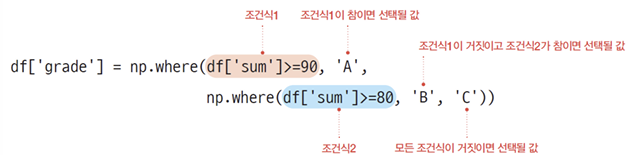
- value_counts(): 특정 열에서 값의 빈도수를 셀 수 있음
import pandas as pd
import numpy as np

df = pd.DataFrame({'name': ['Jessica', 'Liam', 'Sophia', 'Ryan', 'Alex'],
              'test': [45, 30, 40, 37, 48],
              'assign1': [20, 17, 22, 18, 24],
              'assign2': [19, 14, 18, 15, 25]})

df['sum'] = df['test'] + df['assign1'] + df['assign2']

df.rename(columns={'test': 'exam'}, inplace=True)

df['result'] = np.where(df['sum'] >= 80, 'pass', 'fail')

print(df['result'].value_counts())

result
pass    3
fail    2
Name: count, dtype: int64
- df.drop(columns='열 이름'): 데이터 프레임에서 특정 열들을 삭제할 수 있음
import pandas as pd
import numpy as np

df = pd.DataFrame({'name': ['Jessica', 'Liam', 'Sophia', 'Ryan', 'Alex'],
              'test': [45, 30, 40, 37, 48],
              'assign1': [20, 17, 22, 18, 24],
              'assign2': [19, 14, 18, 15, 25]})

df['sum'] = df['test'] + df['assign1'] + df['assign2']

df.rename(columns={'test': 'exam'}, inplace=True)

df['result'] = np.where(df['sum'] >= 80, 'pass', 'fail')

df.drop(columns='result', inplace=True)
print(df)

      name  exam  assign1  assign2  sum
0  Jessica    45       20       19   84
1     Liam    30       17       14   61
2   Sophia    40       22       18   80
3     Ryan    37       18       15   70
4     Alex    48       24       25   97
- 데이터 프레임 시각화하기
import pandas as pd
import numpy as np
import matplotlib.pyplot as plt

df = pd.DataFrame({'name': ['Jessica', 'Liam', 'Sophia', 'Ryan', 'Alex'],
              'test': [45, 30, 40, 37, 48],
              'assign1': [20, 17, 22, 18, 24],
              'assign2': [19, 14, 18, 15, 25]})

df['sum'] = df['test'] + df['assign1'] + df['assign2']

df.rename(columns={'test': 'exam'}, inplace=True)

df['result'] = np.where(df['sum'] >= 80, 'pass', 'fail')

df.drop(columns='result', inplace=True)

plt.figure(figsize=(5, 3))
plt.bar(df['name'], df['sum'])
plt.ylabel('score')
plt.show()
- 누락된 데이터(결측치)가 포함된 데이터프레임 생성하기 (np.nan)
import pandas as pd
import numpy as np
import matplotlib.pyplot as plt

df = pd.DataFrame({'name': ['Jessica', 'Liam', 'Sophia', 'Ryan', 'Alex'],
              'gender': ['F', np.nan, np.nan, 'M', 'F'],
              'score': [80, 75, 95, np.nan, 93]})

print(df)

      name gender  score
0  Jessica      F   80.0
1     Liam    NaN   75.0
2   Sophia    NaN   95.0
3     Ryan      M    NaN
4     Alex      F   93.0
- pd.isna(dataframe): 누락된 데이터가 포함되어 있는지 확인함
import pandas as pd
import numpy as np
import matplotlib.pyplot as plt

df = pd.DataFrame({'name': ['Jessica', 'Liam', 'Sophia', 'Ryan', 'Alex'],
              'gender': ['F', np.nan, np.nan, 'M', 'F'],
              'score': [80, 75, 95, np.nan, 93]})

print(pd.isna(df))
print(df)

    name  gender  score
0  False   False  False
1  False    True  False
2  False    True  False
3  False   False   True
4  False   False  False
- df.dropna(): 누락된 데이터가 포함된 행을 제거함
import pandas as pd
import numpy as np
import matplotlib.pyplot as plt

df = pd.DataFrame({'name': ['Jessica', 'Liam', 'Sophia', 'Ryan', 'Alex'],
              'gender': ['F', np.nan, np.nan, 'M', 'F'],
              'score': [80, 75, 95, np.nan, 93]})

clean_df = df.dropna()
print(clean_df)

      name gender  score
0  Jessica      F   80.0
4     Alex      F   93.0
import pandas as pd
import numpy as np
import matplotlib.pyplot as plt
df = pd.DataFrame({'name': ['Jessica', 'Liam', 'Sophia', 'Ryan', 'Alex'],
'gender': ['F', np.nan, np.nan, 'M', 'F'],
'score': [80, 75, 95, np.nan, 93]})
clean_df = df.dropna(subset=['name', 'score'])
print(clean_df)
name gender score
0 Jessica F 80.0
1 Liam NaN 75.0
2 Sophia NaN 95.0
4 Alex F 93.0
- df.fillna(value): 설정한 값으로 NaN을 대체할 수 있음
import pandas as pd
import numpy as np
import matplotlib.pyplot as plt

df = pd.DataFrame({'name': ['Jessica', 'Liam', 'Sophia', 'Ryan', 'Alex'],
              'gender': ['F', np.nan, np.nan, 'M', 'F'],
              'score': [80, 75, 95, np.nan, 93]})

fill_df = df.fillna(0)
print(fill_df)

      name gender  score
0  Jessica      F   80.0
1     Liam      0   75.0
2   Sophia      0   95.0
3     Ryan      M    0.0
4     Alex      F   93.0
import pandas as pd
import numpy as np
import matplotlib.pyplot as plt
df = pd.DataFrame({'name': ['Jessica', 'Liam', 'Sophia', 'Ryan', 'Alex'],
'gender': ['F', np.nan, np.nan, 'M', 'F'],
'score': [80, 75, 95, np.nan, 93]})
fill_df = df.fillna({'gender': 'etc', 'score': 0})
print(fill_df)
name gender score
0 Jessica F 80.0
1 Liam etc 75.0
2 Sophia etc 95.0
3 Ryan M 0.0
4 Alex F 93.0import pandas as pd
import numpy as np
import matplotlib.pyplot as plt
df = pd.DataFrame({'name': ['Jessica', 'Liam', 'Sophia', 'Ryan', 'Alex'],
'gender': ['F', np.nan, np.nan, 'M', 'F'],
'score': [80, 75, 95, np.nan, 93]})
fill_df = df.fillna({'gender': 'etc', 'score': df['score'].mean()})
print(fill_df)
name gender score
0 Jessica F 80.00
1 Liam etc 75.00
2 Sophia etc 95.00
3 Ryan M 85.75
4 Alex F 93.00
- pd.merge(dataframe1, dataframe2): 데이터프레임 두 개를 하나로 결합할 수 있다.
import pandas as pd
import numpy as np
import matplotlib.pyplot as plt

df1 = pd.DataFrame({'name': ['Jessica', 'Liam', 'Sophia', 'Ryan', 'Alex'],
              'gender': ['F', 'M', 'F', 'M', 'F'],
              'age': [21, 23, 20, 22, 20]})

df2 = pd.DataFrame({'name': ['Jessica', 'Liam', 'Sophia', 'Ryan', 'Alex'],
              'department': ['computer science', 'mathmeatics', 'law',
                             'computer science', 'law']})

df3 = pd.merge(df1, df2, on='name')

df4 = pd.DataFrame({'department': ['computer science', 'mathmeatics', 'law'],
                    'head of department': ['Steve', 'Emma', 'Carly']})

df5 = pd.merge(df3, df4, on='department')
print(df5)

      name gender  age        department head of department
0  Jessica      F   21  computer science              Steve
1     Liam      M   23       mathmeatics               Emma
2   Sophia      F   20               law              Carly
3     Ryan      M   22  computer science              Steve
4     Alex      F   20               law              Carly
3. Pandas Function
- df.count(): 각 열에서 데이터 개수를 구한다.
- df.sum(): 각 열에서 데이터의 합을 구한다.
- df.cumsum(): 각 열에서 데이터의 누적 합을 구한다.
- df.mean(): 각 열에서 데이터의 평균을 구한다.
- df.std(), df.var(): 각 열에서 데이터의 표준편차, 분산을 구한다.
- df.max(), df.min(): 각 열에서 최댓값, 최솟값을 찾는다.
- df.describe(): 각 열에서 기초 통계량을 구한다.
- df['열 이름'].str.find(): 문자열에서 특정 문자열을 왼쪽부터 찾아서 인덱스를 반환한다. 찾는 문자열이 없으면 -1을 반환한다.
- df['열 이름'].str.strip(): 문자열 양옆의 공백 또는 특정 문자를 제거한다.
- df['열 이름'].str.replace(): 특정 문자열을 다른 문자열로 교체한다.
- df['열 이름'].astype(type): 자료형을 변환한다.
4. File Data
- pd.read_csv(csv 파일): csv 파일을 읽어들인다.
- 데이터프레임.to_csv(csv 파일): csv 파일을 저장할 때 pandas의 to_csv 함수를 사용
- 데이터프레임.head(): 데이터프레임의 앞부분을 확인한다.
- 데이터프레임.tail(): 데이터프레임의 뒷부분을 확인한다.
728x90
'4. University Study > Advanced Python Programming' 카테고리의 다른 글
| [Advanced Python Programming] Lecture 15. Web Crawling (0) | 2026.05.27 |
|---|---|
| [Advanced Python Programming] Lecture 13. Data Visualization (0) | 2026.05.25 |
| [Advanced Python Programming] 중간고사 암기 (0) | 2026.04.17 |
| [Advanced Python Programming] Lecture 11. Numpy (0) | 2026.04.17 |
| [Advanced Python Programming] Lecture 10. Exception Handling (1) | 2026.04.17 |
'4. University Study/Advanced Python Programming' Related Articles
more


