
| 일 | 월 | 화 | 수 | 목 | 금 | 토 |
|---|---|---|---|---|---|---|
| 1 | 2 | 3 | 4 | 5 | 6 | |
| 7 | 8 | 9 | 10 | 11 | 12 | 13 |
| 14 | 15 | 16 | 17 | 18 | 19 | 20 |
| 21 | 22 | 23 | 24 | 25 | 26 | 27 |
| 28 | 29 | 30 |
Tags
- Data Science
- cs231n
- Python
- C++
- CPP
- Robocup@Home 2026
- computer vision
- System Call
- BFS
- file system
- deep learning
- Linux
- Gentoo2
- Process
- do it! 알고리즘 코딩테스트: c++편
- Machine Learning
- Multimedia
- ROS2
- Humble
- Seoul National University
- Optimization
- RNN
- On-memory file system
- 밑바닥부터 시작하는 딥러닝2
- Baekjoon
- paper review
- Operating System
- CNN
- SQLD
- DFS
Archives
- Today
- Total
newhaneul
[Advanced Python Programming] Lecture 9. File Input/Output 본문
4. University Study/Advanced Python Programming
[Advanced Python Programming] Lecture 9. File Input/Output
뉴하늘 2026. 4. 17. 00:45728x90
포스팅은 인하대학교 허혜선 교수님의 [202601-EEC3408-001] 고급파이썬프로그래밍을 수강하고 공부한 내용을 정리하기 위한 포스팅입니다.
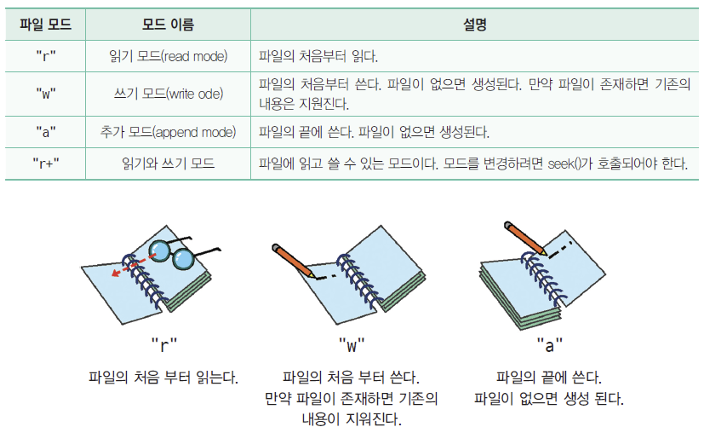
1. 파일 모드
- "r": 읽기 모드(read mode): 파일의 처음부터 읽는다.
- "w": 쓰기 모드(write mode): 파일의 처음부터 쓴다. 파일이 없으면 생성된다. 만약 파일이 존재하면 기존의 내용은 지워진다.
- "a": 추가 모드(append mode): 파일의 끝에 쓴다. 파일이 없으면 생성된다.
- "r+": 읽기와 쓰기 모드: 파일의 내용을 유지한 채 처음부터 쓴다. 읽고 쓸 수 있는 모드이다. 모드를 변경하려면 seek()가 호출되어야 한다.
- "b": 바이너리 모드(binary mode): 텍스트가 아닌 이미지, 영상 등의 이진 파일을 읽고 쓸 때 기존 모드에 붙여서 사용한다. (예: rb, wb)

2. 파일 열기/닫기
- file = open("filename.txt", mode, encoding="utf-8")
- 한글을 읽거나 쓸 때는 파일을 열때 encoding="utf-8"을 추가해야한다.
- file.close()
- with open() as f:
3. 텍스트 읽기 함수
- file.readline(): 파일에서 한 줄씩 문자열을 읽어온다.
- file.readlines(): 파일 전체를 한 번에 읽어 각 줄을 리스트의 원소로 반환한다.
# 기본 흐름
infile = open("d:\\input.txt", "r", encoding="utf-8")
line = infile.readline().rstrip()

while line != "":
    print(line)
    line = infile.readline().rstrip()
with open("filename.txt", "r", encoding="utf-8") as f:
    for line in f:
        line = line.rstrip()
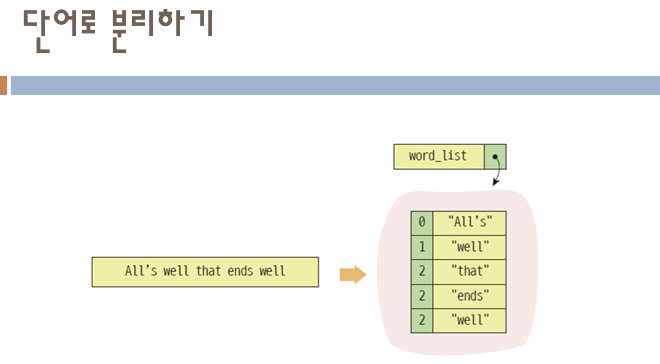
        word_list = line.split()

        for word in word_list:
            print(word)

result = {}
with open("filename.txt", "r") as f:
    for line in f:
        for i in line.strip():
            if i in result:
                result[i] += 1
            else:
                result[i] = 1
- file.tell(): 현재 파일 포인터의 위치를 알려준다.
- file.seek(offset, whence): 파일 포인터의 위치를 원하는 곳으로 강제로 이동시킨다.
- seek(0): 파일의 맨 처음 위치로 되돌리는 것을 의미
728x90
'4. University Study > Advanced Python Programming' 카테고리의 다른 글
| [Advanced Python Programming] Lecture 11. Numpy (0) | 2026.04.17 |
|---|---|
| [Advanced Python Programming] Lecture 10. Exception Handling (1) | 2026.04.17 |
| [Advanced Python Programming] Lecture 8. Module and Package (0) | 2026.04.16 |
| [Advanced Python Programming] Lecture 7. Special Methods (1) | 2026.04.12 |
| [Advanced Python Programming] Lecture 6. Object (1) | 2026.04.12 |
'4. University Study/Advanced Python Programming' Related Articles
more


